PRODUCT INTRODUCTION |
| This product is a battery operated photoelectric smoke alarm, adopting unique structure design and advanced photoelectric sensor technology, able to monitor and detect smoke particles in real time. Especially detects visible particles (associated with smoldering fire) sooner than ionization smoke alarms. Once smoke particles or a fire danger is detected, this alarm will chirp and the red LED will flash rapidly to alert you and your family timely.Furthermore, this alarm has dustproof, mothproof and anti light interference etc. functions, ensuring stability from design basis and suitable for early warning and protection of fires in houses, factories, shopping malls, hotels, office buildings, school buildings, banks, libraries and warehouses etc. indoor places |
| TECHNICAL SPECIFICATION |
◆Power supply: DC 2*1.5V AA(1 year life)
◆Standby current:≤15uA
◆Alarm current: ≤45mA
◆Alarm sound: ≥85dB (3m)
◆Sensor type: Photoelectric
◆Low battery warning: <2.6V
◆Temperature range: 0°C~49°C (32°F~120°F)
◆Humidity: ≤95%RH (No icing or condensatio
◆Detecting area: 60m²at installation height <6m
◆Dimension:Φ 98(D) x 41(H)mm
◆ Executive criteria: EN 14604:2005
◆Networking: WiFi-2.4 GHz
◆WiFi Protocol: IEEE 802.11 b/g/n
| FEATURES |
| ◆Advanced photoelectric sensing technology ◆Low-battery warning ◆Simplicity and elegance ◆SMT manufacture technology: high quality and reliability ◆ Test button for battery and alarm operation verification, Test button; tests unit’s electronic circuitry, buzzer and battery function. Hush function. ◆Loud alarm signal exceeding 85dB in alarm mode ◆Easy installation and maintenance ◆Auto check malfunction. ◆ Low battery warning; smoke alarm will chirp once every 50s to remind user of replacing a new battery. ◆Auto reset ◆ Sound and flash alarm; alarm sound louder than 85 decibels with red LED flashing. ◆ Dustproof, mothproof and anti-white light interference design. ◆Anti-RFI (20V/m-1GHz). |
INSTALLATION |
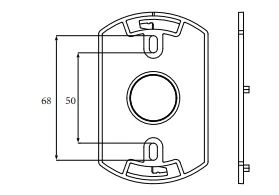
| 1. Avoid installations in places with stagnating smoke, heavy dust, heavy water mist, heavy oil mist, great humidity (>95%) and high wind speed (>5m/s) 2. Choose a proper position. Normally the center of the detection area ceiling is recommended. If impractical, do not install the detector in area without air flow For roof with oblique beam, the ceiling is also oblique where the detector should be installed at a position with 0.9m horizontal distance to spire. Fix the detector base into a chosen position with screws. Then put the detector head into the base and twist clockwise to fasten it Installation dimension of bracket: |
OPERATING INSTRUCTION
1. Battery is equipped on delivery. Test it before install it.
2. The smoke alarm enters into normal monitoring status.
The LED blinks once every 50s.
3. Sensitivity Test
To ensure normal operation, periodic tests should be
performed. Once a month is recommended. For testing,
press and hold the test button more than 3s to enter into
sensitivity test status. The alarm indicator will flash
rapidly and buzzer will give out alarm sound, which
indicates the smoke alarm works properly. During
testing, keep ears away from the smoke alarm to avoid
hearing damage.
4. Malfunction Check
When buzzer beeps once every 50s along with alarm
indicator flashing once rapidly, the battery voltage is
lower than normal operating voltage for the smoke
alarm. Replace the battery.
When buzzer beeps twice (di di) every 50s without alarm
indicator flashing, the infrared photoelectric sensor has
malfunction. For this situation, contact the vendor on
time. Do not dismount or repair alarms privately to avoid
accidents.
5. Detector Replacement
When smoke alarms come into malfunction or have low
battery warning, please replace the smoke detector or
change the battery immediately.
NOTICE
The malfunction auto check function of this smoke alarm
only provides infrared photoelectric sensor malfunction
check and low battery power check. The sensor
sensitivity should be tested periodically as required.To ensure the sensitivity to smoke, clean the smoke
alarm surface with soft brush or cleaner every 6
months. Do not use solvent, liquid or detergent to clean
the smoke alarm.For malfunction problems, please contact vendor on
time. Do not dismantle and try to repair alarms privately.Photoelectric smoke alarms could reduce disaster
happening, but they cannot guarantee 100% safety. For
your safety concern, please use this smoke alarm
correctly and know the fire safety tips. In daily life, pay
attention to build up safety consciousness and take preventive measures
FIRE SAFETY TIPS
Follow fire safety rules and prevent hazardous situations:
1. Store combustible liquids such as gasoline in proper
containers.
2. Never smoke in bed. After smoking a cigarette, put it out
and place in a correct container.
3. Check if power sockets, plugs or switches are broken. If
cables are frayed or cracked, replace them on time.
4. Using power electric appliances such as heaters or
heating equipment, do not make the circuit overload and
check periodically if these appliances work properly.
5. Keep portable heaters and open flames, like candles,
away from flammable materials.
6. Keep matches or lighters away from children.
7. Keep at least one working fire extinguisher on every
floor and an additional one in the kitchen. Have fire
escape ladders or other reliable means of escape from
an upper floor in case stairs are blocked.
8. Make sure all the family members know what to do after
hearing an alarm signal
9. Install smoke alarms correctly according to manual.
Keep alarms clean and do not let dust accumulate and
test them monthly. Replace them immediately if they are
not working properly.
OPERATION AND PAIRING
Step 1:Please download the app by searching "Smart Life" in
the application store or by scanning the QR code below.
Step 2:Register and log in to the app, turn on Bluetooth
1.click + on the upper right corner to add devices.
2.Power on the equipment.
3.Confirm the indicator is flashing.
4.Pop up window "find equipment to be added" and click Add.
5.Connect the smartphone to WIFI(2.4G only), enter the wifi
password and start pairing according to the instructions.
6.Wait for the network pairing to complete.
7.Click next.
8.Click finish
If the distribution network fails, a three tone prompt of "di, di, di"
will appear,it can be powered on again and distributed again.
If successful, the indicator will go out.
To add multiple devices, click "+" in the upper right corner.
Alarm handling:
When the equipment alarm is tested or alarmed, the pop-up
window "smoke alarm" will pop up,
Click View -- > to select the alarm device (with red dot prompt)
- > Click View -- > click -- > mute
(it can stop the equipment alarm, and the silencing key will fail
after 90 seconds)